· อ่าน 13 นาที
FilmCraft TH โปรแกรมตัดต่อวิดีโอภาษาไทย: ติดตั้งบน Mac และ Windows
FilmCraft TH 0.18.0-th.1 อัปเกรดฐานต้นฉบับ 0.18.0 พร้อมวิธีติดตั้ง Mac Apple Silicon / Windows x64, CLI สำหรับ Codex/Claude และ Version Log
4 แอปภาษาไทย: ดาวน์โหลดสำหรับ Mac และ Windows · Version Log และต้นฉบับล่าสุด อัปเกรดตาม tag ต้นฉบับที่ตรวจและเผยแพร่ตัวติดตั้งรุ่นใหม่แล้ว
คู่มือติดตั้งแยกตามระบบ: Mac + GitHub · Windows: MSI / Portable + GitHub · เชื่อม Codex / Claude ผ่าน MCP
FilmCraft TH คือรุ่นปรับส่วนติดต่อภาษาไทยของ FilmCraft โปรแกรมตัดต่อวิดีโอแบบโอเพนซอร์สที่พัฒนาด้วย Rust โดยทีม ArtCraft และผู้ร่วมพัฒนา งานนี้นำโปรแกรมต้นฉบับมาเพิ่มคำแปล เมนู และการตั้งค่าภาษาไทย เพื่อให้ผู้ใช้ไทยเริ่มทำความเข้าใจเครื่องมือได้สะดวกขึ้น
อ่านภาษาไทยก่อน หรือ ข้ามไปอ่าน English version ↓
ดาวน์โหลด DMG สำหรับ Mac Apple Silicon · ดูซอร์สโค้ดบน GitHub
รุ่นนี้เป็นงานปรับแต่งโดยชุมชน ไม่ใช่รุ่นภาษาไทยทางการจาก FilmCraft/ArtCraft ไฟล์ DMG รองรับ Mac Apple Silicon เท่านั้น และยังไม่ผ่าน Apple notarization
รุ่นนี้อัปเดตอะไร?
- รวมซอร์สต้นฉบับ 0.18.0 ทั้ง tag พร้อมคำแปลไทยเดิมและข้อความใหม่
- เพิ่มคำแปล 23 รายการ และเพิ่ม filmcraft-cli ในแพ็กเกจ Mac
- แค็ตตาล็อกภาษาไทย 3,786 รายการ
- ตัวติดตั้ง Mac Apple Silicon และ Windows x64 รวม CLI สำหรับ MCP
ตรวจ Mac จาก DMG จริง: ภาษาไทย บันทึก–เปิดไฟล์งาน และภาพผลลัพธ์ผ่าน; MCP 17 เครื่องมือ. Windows x64 ผ่าน native build/CLI/MCP (17 เครื่องมือ), โครงสร้างแพ็กเกจและ SHA-256; ยังไม่ได้ทดสอบทุก workflow ผ่านหน้าจอ Windows
รุ่นไทย -th.1 ใช้ดาวน์โหลดอัปเดตจากหน้า Releases โดยตรง ตัวตรวจอัปเดตอัตโนมัติของต้นฉบับไม่เสนอชื่อรุ่น prerelease นี้
Version Log รุ่นไทยและผลตรวจ · Release Notes ต้นฉบับ
FilmCraft TH ทำอะไรได้บ้าง
ความสามารถตัดต่อมาจาก FilmCraft ต้นฉบับ ส่วนงานภาษาไทยเน้นข้อความที่ผู้ใช้เห็นในเมนู เครื่องมือ และการตั้งค่า
- จัดการสื่อ: นำเข้าวิดีโอ เสียง และภาพ จัดรายการในถังสื่อ และดูภาพต้นฉบับก่อนตัดต่อ
- ตัดต่อบนไทม์ไลน์: วางคลิปหลายแทร็ก ตัดและเลื่อนคลิป กำหนดจุดเข้า–ออก เพิ่มมาร์กเกอร์และทรานซิชัน
- ปรับภาพและเสียง: ใช้เอฟเฟกต์ คีย์เฟรม เครื่องมือสี และการมิกซ์เสียง รวมถึงกราฟิกและข้อความ
- ส่งออกวิดีโอ: เลือกรูปแบบ ขนาดภาพ อัตราเฟรม บิตเรต และช่วงเวลาที่ต้องการส่งออก หรือจัดงานไว้ในคิว ความพร้อมของ codec และตัวเข้ารหัสขึ้นกับเครื่อง
นี่เป็นการเพิ่มภาษาให้ระบบตัดต่อที่มีอยู่ ไม่ได้เขียนเครื่องมือตัดต่อทั้งหมดขึ้นใหม่ และยังไม่ได้ทดสอบทุกความสามารถของต้นฉบับ
สิ่งที่เพิ่มในรุ่นภาษาไทย
เพิ่มแค็ตตาล็อกคำแปล 3,786 รายการ ครอบคลุมคีย์ที่รวมจากแค็ตตาล็อกภาษาเดิม ณ commit ที่ใช้เป็นฐาน พร้อมตัวเลือก ไทย ในเมนูและการตั้งค่า เมื่อเลือกแล้วโปรแกรมจะจดจำภาษาสำหรับการเปิดครั้งถัดไป เมนู native ของ macOS ใช้ภาษาเดียวกับหน้าจอแอป
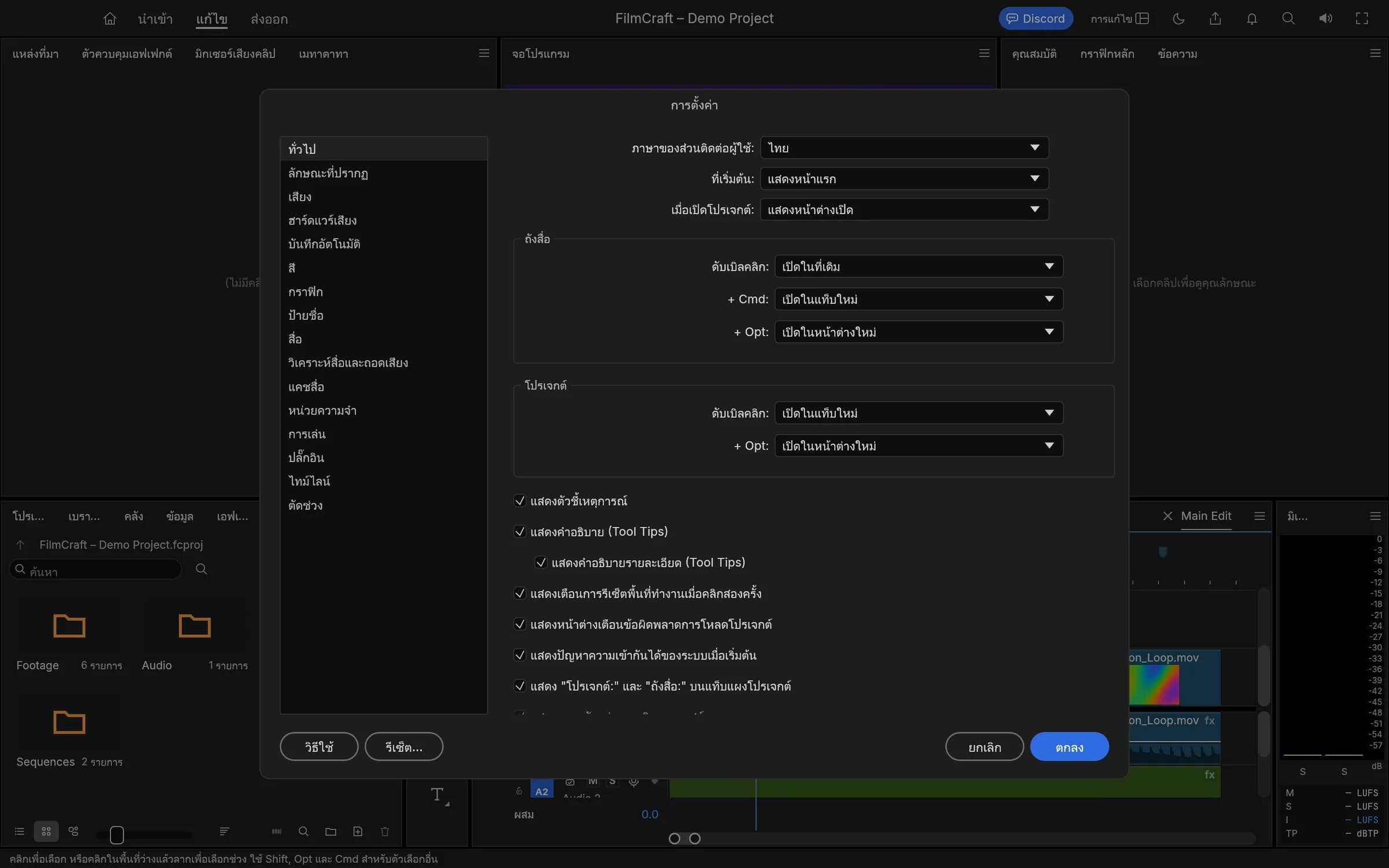
หน้าตั้งค่าภาษาไทย / Thai language settings
ชื่อไฟล์ ชื่อโปรเจกต์ ข้อมูลที่ผู้ใช้ตั้งเอง รหัสคำสั่ง API และชื่อมาตรฐานอย่าง H.264 ยังคงเดิม คำแปลใช้ AI ช่วยร่างและมีการปรับศัพท์ตัดต่อในงานนี้ แต่ยังไม่ได้ตรวจทุกประโยคโดยผู้ตรวจภาษาอิสระ ข้อความจาก engine ระบบปฏิบัติการ หรือไลบรารีภายนอกบางส่วนอาจยังเป็นภาษาอังกฤษ
ดาวน์โหลดและติดตั้งบน Mac
แพ็กเกจ: FilmCraft TH 0.18.0-th.1 · Apple Silicon (arm64) · ประมาณ 104.7 MiB
แพ็กเกจนี้ใช้กับ Mac ชิป Apple Silicon เช่นตระกูล M1, M2, M3 และ M4 ไม่ใช่ Universal Binary และไม่รองรับ Intel กำหนดขั้นต่ำ macOS 11.0 ใน bundle แต่ทดสอบการทำงานจริงบน macOS 26.3.1 เท่านั้น จึงยังไม่ยืนยันการทำงานทุกเวอร์ชัน
- ดาวน์โหลดไฟล์ DMG จาก GitHub Releases ของโครงการนี้
- เปิด DMG แล้วลาก FilmCraft.app ไปยัง Applications หากมีแอปเดิม ให้สำรองงานและแอปเดิมก่อนแทนที่
- เปิด FilmCraft แล้วเลือก Edit → Language → ไทย หรือเลือกภาษาส่วนติดต่อใน Settings
- สร้างหรือเปิดโปรเจกต์ นำเข้าสื่อ แล้วเริ่มวางคลิปลงไทม์ไลน์
หาก macOS แจ้งเตือนตอนเปิดครั้งแรก
รุ่นนี้ลงนามแบบ ad-hoc และยังไม่ผ่าน Apple notarization จึงอาจถูก Gatekeeper เตือนหรือบล็อก ตรวจว่าได้ไฟล์จากโครงการนี้และตรวจค่า SHA-256 ก่อนติดตั้ง หากมั่นใจในแหล่งที่มา ให้ทำตาม คำแนะนำของ Apple เรื่องการเปิดแอปอย่างปลอดภัย ซึ่งอธิบายตัวเลือก Open Anyway ใน System Settings → Privacy and Security โดยไม่ต้องปิด Gatekeeper ทั้งระบบ
ดูรายละเอียดรุ่นและไฟล์ checksum
ส่งออกงานอย่างไร
บันทึกโปรเจกต์ก่อน จากนั้นเปิดหน้า ส่งออก เลือกชื่อไฟล์ ตำแหน่งจัดเก็บ รูปแบบวิดีโอ และช่วงเวลาที่ต้องการ ตรวจขนาดภาพ อัตราเฟรม และเสียง แล้วกด ส่งออก หรือ ส่งไปยังคิว
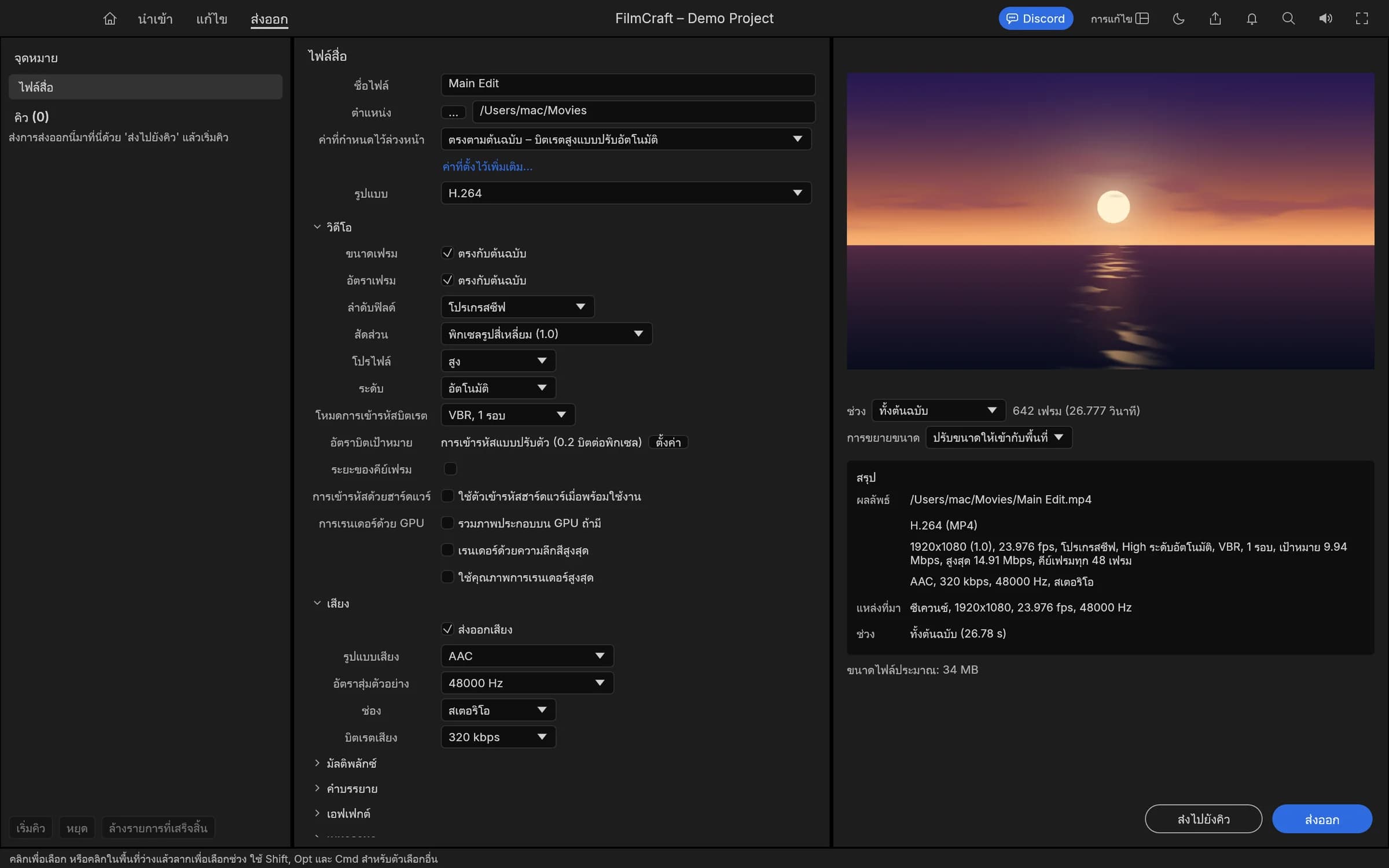
หน้าส่งออกวิดีโอ / Video export workspace
โปรเจกต์ .fcproj เก็บโครงสร้างการตัดต่อและการอ้างอิงสื่อ ควรเก็บไฟล์สื่อต้นฉบับไว้ด้วย ภาพทั้งหมดในบทความใช้โปรเจกต์สาธิตที่ FilmCraft สร้างภาพและเสียงเอง ไม่ใช่งานส่วนตัวของผู้ใช้
ผลตรวจและการพัฒนาต่อ
ตรวจ Mac จาก DMG จริง: ภาษาไทย บันทึก–เปิดไฟล์งาน และภาพผลลัพธ์ผ่าน; MCP 17 เครื่องมือ. Windows x64 ผ่าน native build/CLI/MCP (17 เครื่องมือ), โครงสร้างแพ็กเกจและ SHA-256; ยังไม่ได้ทดสอบทุก workflow ผ่านหน้าจอ Windows ดู ผลตรวจรุ่นนี้
ผลทดสอบของรุ่นก่อนหน้าเก็บไว้เป็นประวัติ รุ่นนี้อ้างอิงผลตรวจและข้อจำกัดในรายงานของ 0.18.0-th.1
ผู้สนใจสามารถศึกษาซอร์ส เสนอคำแปล หรือแจ้งปัญหาผ่าน GitHub ของ FilmCraft TH การอัปเดตทับด้วยรุ่นทางการอาจแทนที่การปรับแต่งภาษาไทยนี้
English: FilmCraft TH — a Thai-localized video editor for Mac
FilmCraft TH is a community Thai-localized build of FilmCraft, the open-source non-linear video editor written in Rust by the ArtCraft team and contributors. This project adds Thai interface text to the existing editor; it does not claim authorship of the original editing engine or endorsement by its developers.
Download the Apple Silicon DMG · Explore the source on GitHub
Editing features and Thai localization
The underlying FilmCraft application provides media organization, multi-track editing, clip trimming, transitions, markers, effects, color tools, keyframes, audio mixing, titles and export settings. Codec and hardware-encoding availability depends on the system.
The Thai build adds 3,786 catalog entries, a Thai language option, saved language preferences and localized macOS menus. Screenshots above show the editing workspace, language settings and export screen using FilmCraft's generated demo media.
File names, project names, user content, API identifiers and format names such as H.264 remain unchanged. Some engine, operating-system and third-party messages may still appear in English. AI assisted the draft translations, followed by terminology revisions; a complete independent linguistic review is still pending.
Download and install on macOS
Version: 0.18.0-th.1 · Architecture: Apple Silicon / arm64 · Download size: approximately 104.7 MiB.
This package is not for Intel Macs. Its bundle declares macOS 11.0 as the minimum, but runtime testing was performed only on macOS 26.3.1. Compatibility with every earlier macOS release has not been verified.
- Download the DMG from the project's GitHub release.
- Open it and drag FilmCraft.app into Applications. Back up your projects and previous app before replacing an existing installation.
- Launch FilmCraft and choose Edit → Language → ไทย, or set the interface language in Settings.
- Create or open a project, import media and arrange clips on the timeline. Save the project, then use the Export workspace to configure the output or add it to the queue.
The app is ad-hoc signed and not Apple-notarized. Gatekeeper may warn or block first launch. Verify the source and checksum before installation. If you trust the file, follow Apple's guidance for safely opening apps, including the Open Anyway option in Privacy and Security where available. Do not disable Gatekeeper globally.
Validation and limitations
The mounted DMG, app/CLI signatures, Thai preferences, native project save/reopen and real editing/settings/export screens were checked. The bundled CLI rendered the saved project to PNG and passed MCP initialization/tools listing. See current validation.
Validation of this release is recorded separately from historical reports. Windows builds and CLI/MCP checks ran in native Windows CI; manual testing of every Windows GUI workflow is not claimed. Update checks use the Thai repository.
SHA-256 / ตรวจสอบไฟล์ดาวน์โหลด
File: FilmCraft-TH-0.18.0-th.1-macOS-arm64.dmg
8e297b81d2ca010a2227a95453fc190414883c026c7eff83b58a2f8881e115af
Credits and source / เครดิตและซอร์สต้นฉบับ
- Original project: storytold/filmcraft, by the ArtCraft team and contributors.
- Upstream base: 015d5b3e, version 0.18.0.
- Thai source and download: tapanapon-com/filmcraft-th, with platform build provenance recorded in the current release.
- Shared Thai labels: storytold/craft-i18n.
- Original code and Thai modifications are available under MIT OR Apache-2.0. Original license files and NOTICE are retained in the repository and app. Screenshot credits are listed in the repository's ATTRIBUTION.md.
FilmCraft and ArtCraft names identify the original project. This community release is not an official FilmCraft/ArtCraft distribution.
วิธีติดตั้งบน Mac
- ดาวน์โหลด DMG สำหรับ Apple Silicon จากลิงก์รุ่นภาษาไทยในบทความนี้
- บันทึกงานและปิดแอปเดิม เปิด DMG แล้วลากแอปเข้า Applications
- เปิดจาก Applications และเลือกภาษาไทย หาก macOS แจ้งเตือนให้อ่าน คู่มือติดตั้ง Mac ฉบับเต็ม
วิธีติดตั้งบน Windows
- เลือกไฟล์ Windows x64 MSI เพื่อติดตั้ง หรือ Portable ZIP เพื่อแตกไฟล์ใช้งาน
- MSI: เปิดตัวติดตั้งและทำตามหน้าจอ จากนั้นเปิดผ่าน Start Menu
- Portable: ใช้ Extract All แล้วเปิดไฟล์ .exe จากโฟลเดอร์ที่แตกครบ
- เลือกภาษาไทยและตรวจข้อจำกัดของรุ่น อ่าน คู่มือ Windows และการเลือกไฟล์จาก GitHub
ใช้ร่วมกับ Codex หรือ Claude
ต้องมี CLI ของแอปและลงทะเบียน MCP ก่อน โดยโหมด Headless กับการเชื่อมหน้าต่างจริงทำงานต่างกัน อ่าน คู่มือเชื่อม Craft ทั้งชุดกับ Codex / Claude พร้อมพาธ Mac/Windows และเอกสารต้นทาง
รุ่นไทย 0.18.0-th.1 รวม tag ต้นฉบับ v0.18.0 และเผยแพร่ตัวติดตั้ง Mac Apple Silicon / Windows x64 ที่ตรวจแล้ว ดู Version Log และผลตรวจ สำหรับรายละเอียดและข้อจำกัดของแต่ละแพลตฟอร์ม
บทความอื่น
9 พฤศจิกายน 2569
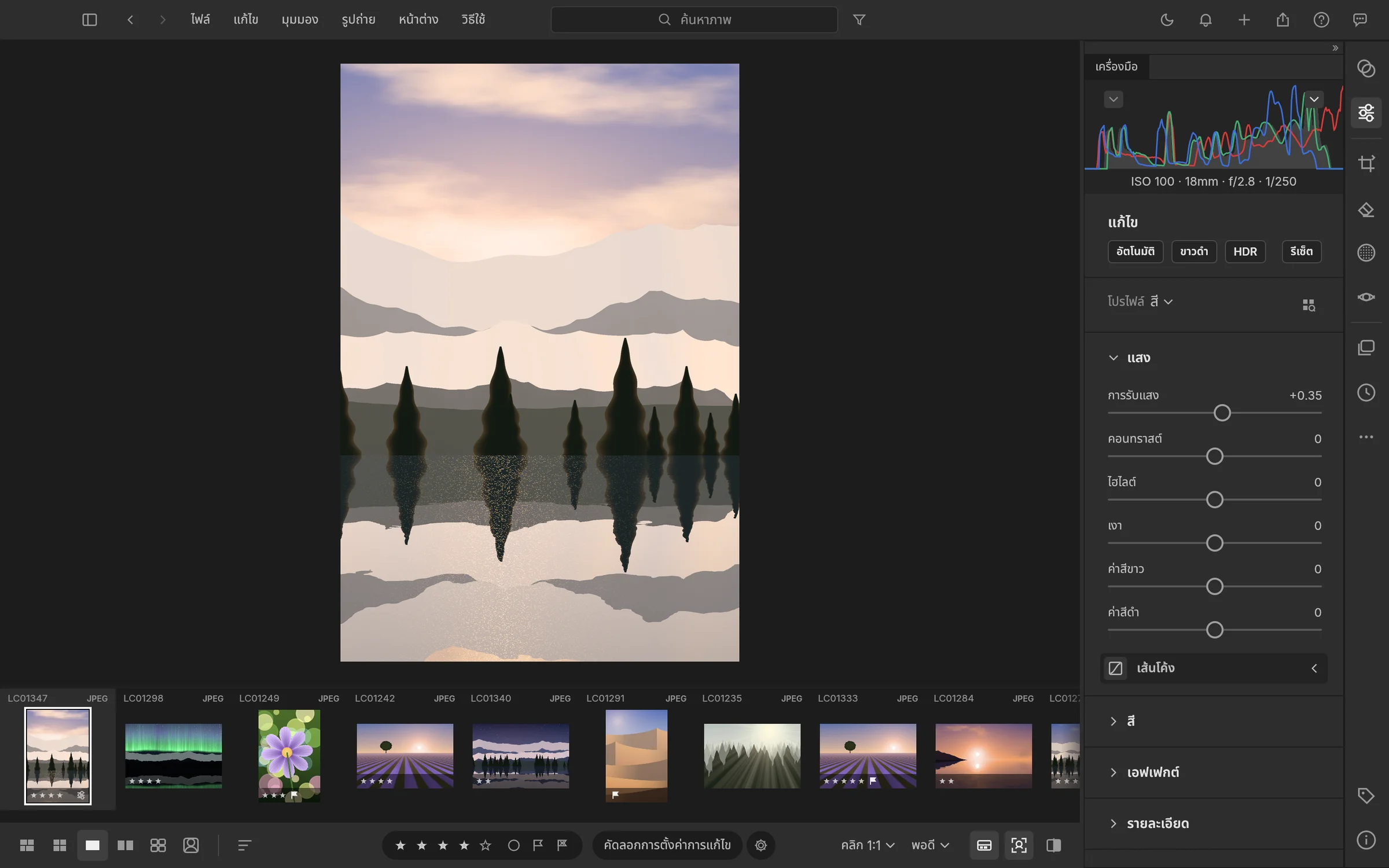
LightCraft TH โปรแกรมจัดคลังภาพและแต่ง RAW ภาษาไทย สำหรับ Mac และ Windows
มาแล้ว LightCraft TH 0.20.0-th.1 พร้อมภาพหน้าจอภาษาไทยจริง ตัวติดตั้ง Mac Apple Silicon / Windows x64 คู่มือ GitHub และเชื่อม Codex/Claude
อ่านต่อ ›
7 พฤศจิกายน 2569
ติดตั้ง Craft บน Windows: เลือก MSI หรือ Portable จาก GitHub
ติดตั้ง Craft ภาษาไทยบน Windows x64 แบบทีละขั้น แยก MSI กับ Portable ZIP เลือกไฟล์ใน GitHub Releases และตรวจ SHA-256 ด้วย PowerShell
อ่านต่อ ›7 พฤศจิกายน 2569
ติดตั้ง Craft บน Mac: ดาวน์โหลดจาก GitHub แล้วใช้ยังไง?
คู่มือติดตั้ง VectorCraft, PhotoCraft และ FilmCraft ภาษาไทยบน Mac Apple Silicon เลือก DMG จาก GitHub Releases แยกจาก Source code พร้อมวิธีตรวจ SHA-256
อ่านต่อ ›